

S310-24P4X
| Item | Details |
|---|---|
| Product description | S310-24P4X (24×10/100/1000BASE-T ports with PoE+, 4×10GE SFP+ ports, AC power supply) |
| Part number | 98010963 |
| PoE power supply | 740W/370W/110W |
Note: The S310-24P4X with 1 AC power supply supports the PoE function.
| Port Name | General & Type | Description | Available Components |
|---|---|---|---|
| 10/100/1000BASE-T PoE+ Port | |||
| GE0–GE23 (24 ports) |
RJ-45 | 24× 10/100/1000BASE-T auto-negotiation PoE+ ports. All ports support IEEE 802.3af (15.4 W/port) and IEEE 802.3at (30 W/port). The switch dynamically allocates PoE budget from the installed PSU across all 24 ports. Per-port PoE scheduling and priority-based power management are supported. When total demand exceeds PSU budget, the lowest-priority ports are powered off first. Also supports: auto-MDI/MDIX, loop detection, per-port PoE enable/disable via CLI or web GUI. |
Cat5e / Cat6 UTP copper cable IEEE 802.3af PoE PDs (15.4 W) IEEE 802.3at PoE+ PDs (30 W) IP cameras, APs, IP phones, thin clients, access control panels |
| 10GE SFP+ Uplink Port | |||
| 10GE0–10GE3 (4 ports) |
SFP+ | 4× 10GE SFP+ ports supporting 10GBASE-SR/LR optical transceivers and passive 10G DAC cables. Backward compatible with 1GE SFP transceivers in 1GE mode. Used for uplinks to distribution/core switches or for stacking multiple access-layer switches. Auto-negotiation between 1GE and 10GE modes based on installed transceiver. |
10GE SFP+ SR (850 nm, OM3, 300 m) 10GE SFP+ LR (1310 nm, SMF, 10 km) 10G Passive DAC (≤ 3 m) 1GE SFP SX / LX / T Huawei-certified modules strongly recommended |
| Console Port | |||
| Console | RJ-45 | Out-of-band management port for CLI access via terminal emulator (PuTTY, SecureCRT, etc.). Used for initial setup, troubleshooting, and password recovery. Default settings: 9600 bps, 8 data bits, no parity, 1 stop bit (9600-8-N-1). Requires a USB-to-RJ45 rollover console cable connected to a PC. |
RJ-45 rollover console cable USB-to-RJ45 adapter (for modern PCs) |
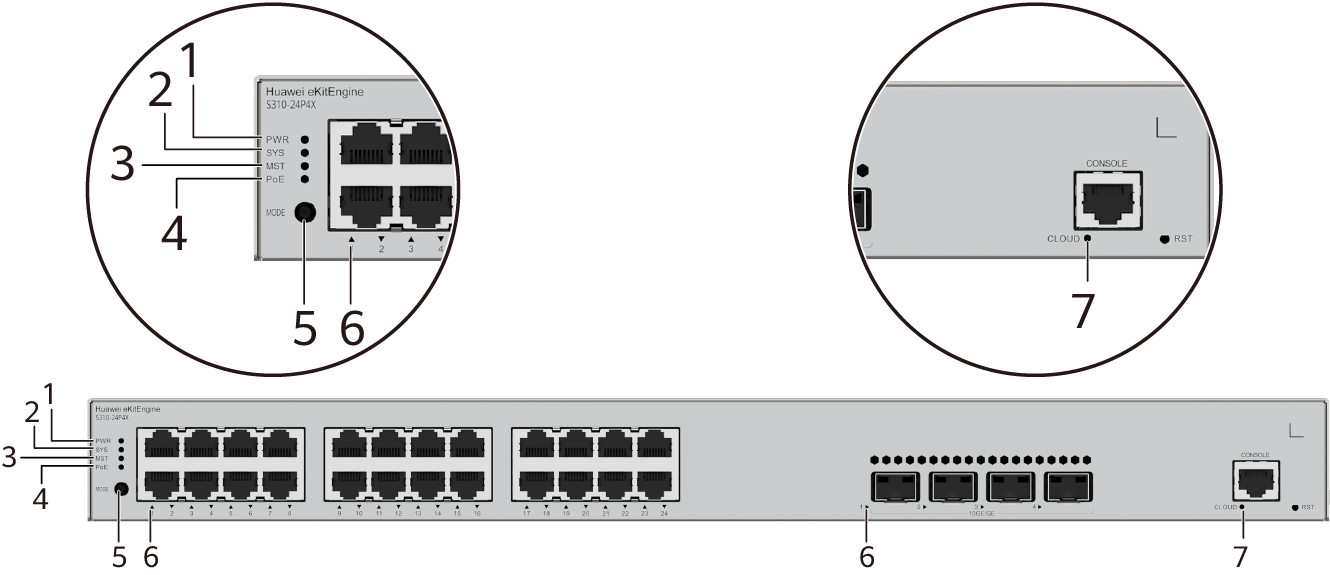
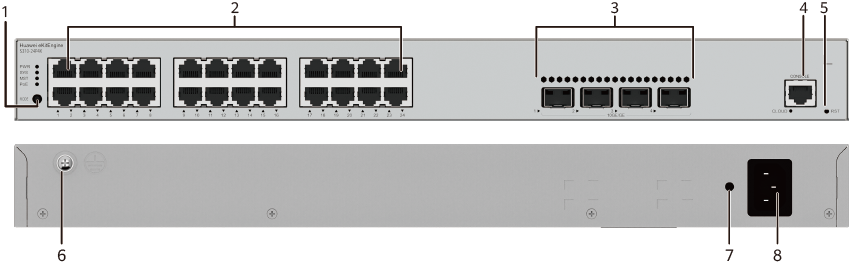
Front panel (port side)
Rear panel (cable inlet side)
| No. | Indicator | Name | Color | Status | Description |
|---|---|---|---|---|---|
| 1 | PWR | Power indicator | Green | Steady on | The power supply is working normally. |
| Yellow | Steady on | The power supply is abnormal. | |||
| 2 | SYS | System indicator | Green | Blinking (1 Hz) | The system is running normally. |
| Green | Steady on | The system is starting up or loading firmware. | |||
| Yellow | Steady on | A system fault has occurred. Contact Huawei technical support for assistance. | |||
| Off | Off | The system is powered off. | |||
| 3 | LINK/ACT | Port link and activity indicator (GE ports 0–23) | Green | Steady on | A 1000M link is established. No data is currently being transmitted or received. |
| Green | Blinking | A 1000M link is established and data is being transmitted or received. | |||
| Yellow | Steady on | A 10M or 100M link is established. No active traffic on this port. | |||
| Yellow | Blinking | A 10M or 100M link is established and data is being transmitted or received. | |||
| Green | Slow blink (0.5 Hz) | A loop has been detected on this port. Traffic forwarding may be suspended to prevent broadcast storms. | |||
| Off | Off | No cable is connected, or the port has been administratively shut down. | |||
| 4 | PoE | Per-port PoE indicator | Green | Steady on | The port is supplying PoE power normally to the connected PD. |
| Yellow | Steady on | The connected PD power request exceeds the port or overall switch PoE budget. Power delivery has been suspended or capped. | |||
| Yellow | Blinking (2 Hz) | A PD was detected but power delivery has failed. Check PD compatibility, the PoE budget, and cable integrity. | |||
| Off | Off | PoE is disabled on this port, or no PoE-capable PD is connected to this port. | |||
| 5 | LINK/ACT | 10GE SFP+ port link and activity indicator (10GE ports 0–3) | Green | Steady on | A 10GE link is established. No data is currently being forwarded. |
| Green | Blinking | A 10GE link is established and data traffic is actively being forwarded. | |||
| Yellow | Steady on | A 1GE link is established (SFP module in 1GE compatibility mode). No active traffic. | |||
| Yellow | Blinking | A 1GE link is established and data is being transmitted or received. | |||
| Off | Off | No transceiver or cable is connected, or the port has been shut down. | |||
| 6 | — | Console port indicator | — | — | The device communicates with other devices through the console port. No dedicated indicator; port activity is visible in CLI only. |
| Display Mode | Color | Status | Description |
|---|---|---|---|
| Link/Speed Mode (default) | |||
| Link/Speed Mode | Green | Steady on | A 1000M link is established on the corresponding port. No data is currently being transmitted or received — the port is idle at gigabit speed. |
| Green | Blinking | A 1000M link is established and data is being transmitted or received on this port. | |
| Yellow | Steady on | A 10M or 100M link is established. The port is operating at a lower speed due to the connected device's capability or cable quality. | |
| Yellow | Blinking | A 10M or 100M link is established and data is being actively transmitted or received. | |
| Off | Off | No link is established on this port. The cable may be disconnected or the port has been shut down administratively. | |
| PoE Mode | |||
| PoE Mode | Green | Steady on | PoE power is being supplied normally to the connected PD. Power delivery is stable and within the port's PoE budget. |
| Yellow | Steady on | The PoE power supply is abnormal — the PD may have requested power exceeding the port PoE limit or the overall PSU PoE budget. | |
| Yellow | Alternate blinking | Two PoE port indicators alternate blinking — indicates a system-wide PoE power budget shortage. Reduce the number of PoE PDs connected or upgrade to a higher-capacity PSU. | |
| Off | Off | PoE is disabled on this port, or no PoE-capable PD is connected to this port. | |
| PoE+ Mode | |||
| PoE+ Mode | Green | Steady on | PoE+ power (up to 30 W) is being supplied normally to the connected PoE+ PD. Power delivery is stable and within the PoE+ budget. |
| Yellow | Blinking | The port is in PoE+ power negotiation, or the connected PD has requested more power than the port or system PoE+ budget allows. | |
| Off | Off | PoE+ is disabled on this port, or no PoE+-capable PD is connected to this port. | |
AC Power Supply
The S310-24P4X supports one built-in AC PSU. The PSU powers both switch operations and PoE delivery to connected PDs. Available PSU options to match deployment PoE requirements:
- 740W PSU — up to 740 W total PoE budget (recommended for high-density PoE+ deployments)
- 370W PSU — up to 370 W total PoE budget
- 110W PSU — for limited PoE deployments with a small number of PDs
PoE Budget & Priority Management
PoE budget is shared dynamically across all 24 GE ports. The switch enforces per-port and aggregate PoE limits to prevent overloads:
- Max per-port PoE+: 30 W (IEEE 802.3at)
- Max aggregate budget: up to 740 W (with 740W PSU)
- Priority-based management — ports with the lowest configured priority are powered off first when the PoE budget is exceeded
- Per-port PoE enable/disable configurable via CLI, web GUI, or iMaster NCE-Campus
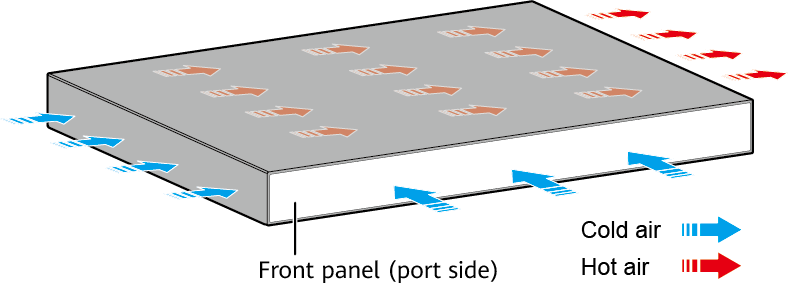
Front panel (port side) — Cold air inlet → Rear panel — Hot air outlet
Airflow Direction
Cold air is drawn in through the front panel (port side) and expelled as hot air from the rear panel. A built-in fan module with smart speed control automatically adjusts fan RPM based on real-time internal temperature sensor readings — balancing cooling performance with acoustic noise. Operating noise level: ≤ 42 dB(A) at 25°C ambient.
Installation Requirements
- Leave ≥ 10 cm clearance at the front and rear of the switch for airflow
- Leave ≥ 5 cm clearance on the left and right sides
- Do not obstruct front or rear ventilation panels with cables or objects
- Operating temperature: 0°C to +45°C (long-term)
- Operating humidity: 5%–95% RH, non-condensing
- Mount in a 19-inch rack using supplied rack-mount ears; ensure the rack cabinet has adequate airflow
| Parameter | Specification |
|---|---|
| Hardware | |
| Dimensions (H × W × D) [mm] | 43.6 × 440 × 220 mm (1U rackmount) |
| Fixed downlink ports (GE RJ-45 PoE+) | 24× 10/100/1000BASE-T — all 24 ports PoE+ capable |
| Fixed uplink ports (10GE SFP+) | 4× 10GE SFP+ (supports 1GE SFP backward compatible) |
| Switching capacity [Gbps] | 336 Gbps |
| Packet forwarding rate [Mpps] | 252 Mpps |
| System memory (DRAM) | 512 MB |
| Flash memory | 1 GB (eMMC) |
| Number of power supplies | 1 (built-in, fixed) |
| PoE | |
| PoE standard | IEEE 802.3af (PoE, 15.4 W/port) / IEEE 802.3at (PoE+, 30 W/port) |
| Maximum PoE power per port [W] | 30 W (PoE+) |
| Maximum total PoE budget [W] | 740 W (with 740W PSU) / 370 W (with 370W PSU) / 110 W (with 110W PSU) |
| Number of PoE ports | 24 |
| Spanning Tree Protocol (STP) | |
| STP standards | IEEE 802.1D STP, IEEE 802.1w RSTP, IEEE 802.1s MSTP |
| MSTP instances | 64 instances |
| MAC | |
| MAC address table size | 16K entries |
| MAC features | Static MAC, dynamic MAC, blackhole MAC, MAC address learning limit, configurable aging timer |
| VLAN | |
| VLAN quantity | Up to 4094 VLANs (range 1–4094) |
| VLAN types | Port-based VLAN, IEEE 802.1Q VLAN, voice VLAN, management VLAN, QinQ (basic) |
| GVRP | Supported — dynamic VLAN registration and propagation |
| IP Routing | |
| Routing protocols | Static routing (IPv4/IPv6), RIPv1/v2, OSPFv2/v3 |
| IP routing table entries | 2K IPv4 routes / 512 IPv6 routes (hardware forwarding table) |
| IPv6 | Full dual-stack IPv4/IPv6; SLAAC, DHCPv6 client/server/relay, MLD v1/v2 |
| DHCP | DHCP server, DHCP relay, DHCP snooping, DHCP option 60/82 |
| Multicast | |
| IGMP snooping | IGMPv1/v2/v3 snooping; fast leave; static group; IGMP proxy |
| MVR | Multicast VLAN Registration (MVR) |
| Multicast groups (hardware) | 1K multicast groups |
| QoS | |
| Queue scheduling | SP, WRR, SP+WRR — 8 egress queues per port |
| Traffic classification | 802.1p (CoS), DSCP, port-based default priority |
| Traffic shaping | Port-based and flow-based; CAR (committed access rate) |
| Priority re-marking | CoS/DSCP re-marking at ingress and egress (policy-based) |
| Reliability | |
| SEP (Smart Ethernet Protection) | Supported — sub-50 ms ring protection for campus networks |
| ERPS (G.8032) | Ethernet Ring Protection Switching — ring and ladder topologies |
| VRRP | VRRPv2 (IPv4), VRRPv3 (IPv4/IPv6) — gateway redundancy |
| BFD | BFD for OSPF, IS-IS, BGP, static routes (rapid fault detection) |
| LACP | IEEE 802.3ad — up to 8 member ports per LAG, up to 8 LAGs |
| Jumbo frames | Supported — up to 9600 bytes |
| Flow control | IEEE 802.3x full-duplex; back pressure (half-duplex) |
| Security | |
| AAA / 802.1X | RADIUS, HWTACACS+, local AAA; 802.1X port auth; MAC auth; portal (web auth) |
| ACL | Basic and advanced ACL (L2/L3/L4); time-based ACL; up to 4096 rules |
| DHCP snooping | Prevents rogue DHCP server attacks; binding table for IP source guard |
| IP source guard | Per-port source IP filtering using DHCP snooping binding table (prevents IP spoofing) |
| Dynamic ARP inspection | ARP rate limiting and entry limiting to prevent ARP flooding/poisoning |
| Port isolation | L2 port isolation within the same VLAN |
| Storm control | Per-port broadcast/multicast/unknown unicast storm control (PPS or BPS configurable) |
| SSH / HTTPS | SSHv2, HTTPS (TLS 1.2+) — encrypted management access |
| CPU protection | Hardware-based DoS protection; control-plane policing (CoPP) |
| Management | |
| CLI | Console + SSHv2 (character-mode Huawei VRP CLI) |
| Web GUI | HTTPS-based web management portal |
| SNMP | SNMPv1/v2c/v3 with MIB II and Huawei enterprise MIB |
| NETCONF/YANG | Supported (RFC 6241) — programmable configuration and telemetry |
| Network management system | iMaster NCE-Campus (cloud/on-premises), eSight, third-party NMS (SNMP) |
| Zero-touch provisioning | Supported via iMaster NCE-Campus and DHCP/DNS-based auto-config |
| Syslog | Syslog over UDP/TCP; up to 4 log servers; severity levels 0–7 |
| RMON | RMON groups 1, 2, 3, 9 (statistics, history, alarms, events) |
| Port mirroring | 1:1 and N:1 port mirroring; VLAN-based, MAC-based, flow-based mirroring |
| LLDP | IEEE 802.1AB LLDP with MED extensions |
| NTP / SNTP | NTP/SNTP client — time synchronization |
| Environmental | |
| Operating temperature [°C] | 0°C to +45°C (long-term) / –5°C to +55°C (short-term, ≤ 96 h) |
| Storage temperature [°C] | –40°C to +70°C |
| Operating humidity | 5%–95% RH, non-condensing |
| Altitude [m] | ≤ 4000 m (operating); ≤ 6000 m (storage) |
| Noise level [dB(A)] | ≤ 42 dB(A) at 25°C ambient |
| MTBF [hours] | > 200,000 hours |
| Power | |
| AC input voltage [V] | 100V–240V AC, 50/60 Hz, auto-sensing |
| Input current [A] | ≤ 10.5 A (at 100V AC input, full PoE load) |
| Rated power — switch only [W] | ≤ 60 W (no PoE load) |
| Rated power — switch + full PoE [W] | ≤ 800 W (switch + 740W PoE at full load) |
| Power supply unit | Single built-in AC PSU — 110W / 370W / 740W options |
| Standards & Compliance | |
| Safety | IEC/EN 62368-1, UL 62368-1, CAN/CSA C22.2 No. 62368-1 |
| EMC emissions | FCC Part 15 Class A, EN 55032 Class A, VCCI Class A, CISPR 32 Class A |
| EMC immunity | EN 55024, EN 61000-3-2/-3-3 |
| RoHS | EU Directive 2011/65/EU (RoHS 2) + Amendment 2015/863/EU |
| REACH | EU Regulation No 1907/2006 (SVHC compliant) |
| Energy efficiency | ENERGY STAR Network Equipment v1.0; EU ErP Directive 2009/125/EC |
| Green certification | China RoHS (SJ/T 11364-2014) |