AP160

Basic information about the AP160

Item

Details

Description

AP160(11ax indoor, 2+2 dual bands, smart antenna)

Part Number

50086816

Model

AP160

First supported version

V200R023C00

Appearance of the AP160

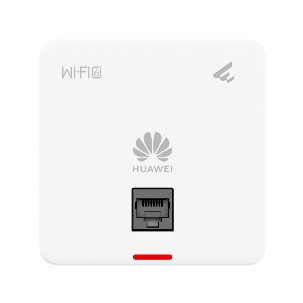
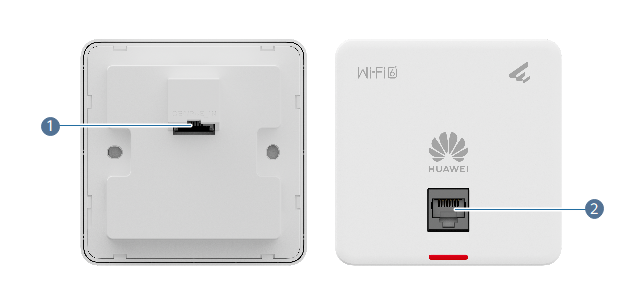
Figure 6-4 Appearance of the AP160 showing the design, ports, and other physical aspects of the device.

Basic information about the AP160

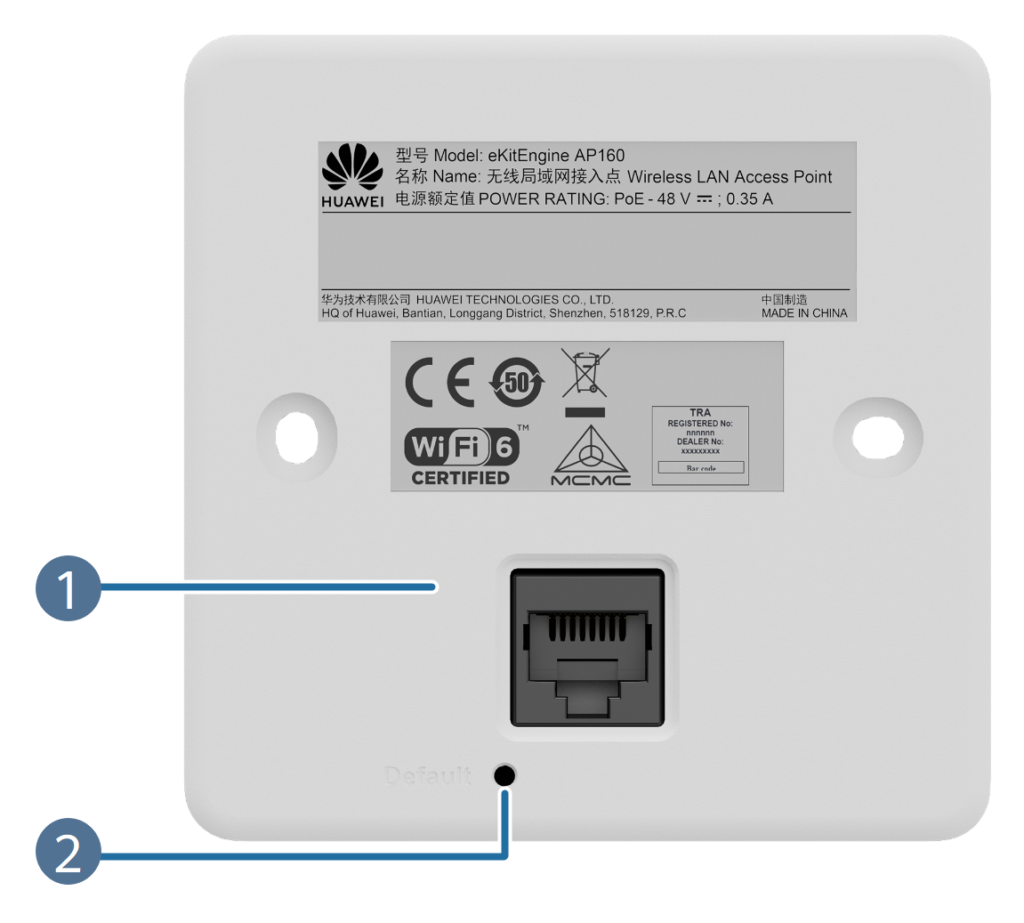
Figure 6-5 Ports on the AP160 with labeled details explaining the connectivity options available.

1

GE0/PoE_IN

2

GE1

Port

Connector Type

Details

Details

GE0/Poe_IN

RJ45

Ethernet electrical port that supports 10M/100M/1000M auto-sensing, connects to the wired Ethernet network, and supports PoE input, supporting SME Wireless Network Infrastructure deployments.

Network cable

GE1

RJ45

Ethernet electrical port that supports 10M/100M/1000M auto-sensing and connects to the wired Ethernet, supporting deployments by an SME Network WLAN Hardware Supplier.

Network cable

Indicators and Buttons

Figure 6-6 Indicators and buttons on the AP160

The indicator is located inside the panel, which turns on after the AP is powered on.

No.

Indicator

Default

1

Indicator

Default

The indicator is located inside the panel, which turns on after the AP is powered on.

SilkScreen

Name

Colour

Status

Description

System indicator

Green

Steady on

The AP is just powered on and the software is not started yet.

Green

Steady on after blinking once

After the system is reset and begins uploading the software, the indicator flashes green once. It then remains solid green until the software installation is complete and the device becomes fully operational, supporting Secure WLAN Solutions for SMEs.

Green

Slow blinking (0.5 Hz)

The AP is operating in Fat or Fit mode, the Ethernet connection is functioning normally, and STAs are connected to the device.

Green

Slow blinking (0.2 Hz)

The AP operates in Fat or Fit mode with a stable Ethernet connection, and no STA is currently associated, maintaining readiness within SME Wireless Network Infrastructure deployments.

Green

Blinking once every 0.25s (4 Hz)

The AP is operating in Fat or Fit mode.
A software upgrade is currently in progress.
In Fit mode, the AP is attempting to come online or has been unable to establish an online connection, as part of Business WiFi Access Points Huawei deployments.

Blue

Slow blinking (0.5 Hz)

The AP is operating in cloud mode, successfully connected to the cloud management controller, and functioning normally.

Blue

Blinking once every 0.25s (4 Hz)

The AP is operating in cloud mode and is establishing a connection with the cloud management controller, including reconnection after a disconnection, supporting Secure WLAN Solutions for SMEs.

Yellow (blinking red and green at the same time, causing color deviation)

Blinking once every 0.25s (4 Hz)

Press and hold the Default button for over six seconds to reset the device to its factory settings. This feature is available only in V200R024C00 and V200R024C10. This function is supported only in V200R024C00 and V200R024C10.

Red

Blinking once every 0.25s (4 Hz)

Press and hold the Default button for more than six seconds to restore the device to its factory settings. This function is supported in V200R25C00 or later versions, as provided by an Enterprise Network Hardware Supplier India. .

Red

Steady on

A service-impacting fault has occurred, such as a DRAM detection error or a system software loading failure. This issue cannot be resolved automatically and requires manual intervention.

Indicators on the AP160

SilkScreen

Name

Description

Default

Reset button

1. For V200R023C00: Pressing the button resets the device. Holding the button for more than six seconds restores the factory settings, switches the device to Fit mode, and initiates a restart, supporting Secure WLAN Solutions for SMEs. 2. For V200R023C10: Pressing the button performs a device reset. Holding it for more than six seconds restores the factory settings, switches the device to cloud mode, and restarts it. 3. For V200R024C00 and V200R024C10: Pressing the button resets the device. Holding it for more than six seconds causes the indicator to blink yellow, flashing red and green rapidly at the same time, after which the device restores its factory settings, switches to cloud mode, and restarts as part of Huawei Enterprise WLAN Solutions. 4. For V200R025C00 or later: Pressing the button resets the device. Holding it for more than six seconds causes the indicator to flash red rapidly, after which the device restores its factory settings, switches to cloud mode, and restarts, aligning with Business WiFi Access Points Huawei deployments.
Technical specifications of the AP160

Item

Specification

Installation Type

86 mm x 86 mm x 42.5 mm (3.39 in. x 3.39 in. x 1.67 in.)

Dimensions without packaging (H x W x D) [mm(in.)]

98 mm x 117 mm x 73 mm (3.86 in. x 4.61 in. x 2.87 in.)

Weight without packaging [kg(lb)]

0.14 kg (0.31 lb)

Weight with packaging [kg(lb)]

0.24 kg (0.53 lb)

Storage

NAND Flash 256 MB

Console port

None

Maximum power consumption [W]

9.1 W

Maximum heat dissipation [BTU/hour]

29.5 BTU/hour

Power supply mode

PoE

Input voltage range [V]

PoE: 802.3af

Service port surge protection

PoE port: Common mode (8 wires to ground): 4 kV (1.25/0 us, 42 ohms), criterion C

PoE OUT

Not supported

Maximum number of physical ports on the entire device

GE (RJ45) x 2, 10M/100M/1000M auto-sensing

Long-term operating temperature [°C(°F)]

0°C to 40°C (32°F to 104°F) (From 1800 m to 5000 m [5905.51 ft to 16404.20 ft], the maximum ambient temperature decreases by 1°C [1.8°F] for every 300 m [984.25 ft] increase in altitude.)

Storage temperature [°C(°F)]

-40°C to +70°C (-40°F to +158°F)

Long-term operating relative humidity [RH]

5% RH to 95% RH, non-condensing

Long-term operating altitude [m(ft.)]

-60 m to +5000 m (~-196.85 ft to +16404.20 ft)

Atmospheric pressure [kPa]

53 kPa - 106 kPa ETSI 300 019-2-3

Ground

Floating ground

USB

Not supported

IoT slot

Not supported

BLE

Not supported

Radio number

2

Operating frequency band

2.4GHz, 5GHz

MIMO spatial streams

Radio 0 (2.4 GHz): 2x2

Radio 1 (5 GHz): 2x2

Wi-Fi standard

2.4G: 802.11b/g/n/ax

5G: 802.11a/n/ac/ac Wave 2/ax

Radio interface

Built-in smart antennas

Antenna gain

2.4 GHz: 3 dBi/chain (peak value)
3 dBi (combined gain)
5 GHz: 2 dBi/chain (peak value)
1 dBi (combined gain)

Maximum transmit power

2.4G: 17 dBm/chain
20 dBm (combined power)
5G: 17 dBm/chain
20 dBm (combined power)

Signal radio transmit power [dBm]

2.4 GHz: 0 dBm to 17 dBm/chain
5 GHz: 0 dBm to 17 dBm/chain

MTBF [year]

446 year

MTTR [hour]

2 hour

Frequency stability [ppm]

+/-20

802.3bt power supply description

No function is limited.

802.3at power supply description

No function is limited.

802.3af power supply description

No function is limited.

DC power supply description

Not supported

Common Questions

What is SME Network WLAN hardware?

SME Network WLAN hardware includes business-grade access points and controllers designed to deliver secure and reliable wireless connectivity for small and medium enterprises.

Huawei Enterprise WLAN Solutions provide dependable performance, centralised management and strong security tailored to SME business needs.

Enterprise WLAN offers higher capacity, improved security, better stability and centralised control compared to standard consumer WiFi.

Huawei WLAN supports advanced encryption, authentication protocols and access control features to protect business network traffic.

Huawei WLAN solutions allow easy expansion by adding access points and management capabilities as business requirements increase.

Security Systems